Cincinnati.com: The Enquirer
- 2.6
- Rating
- 50.00K
- Installs
- Free
- Price

 Analysis by App-foxy
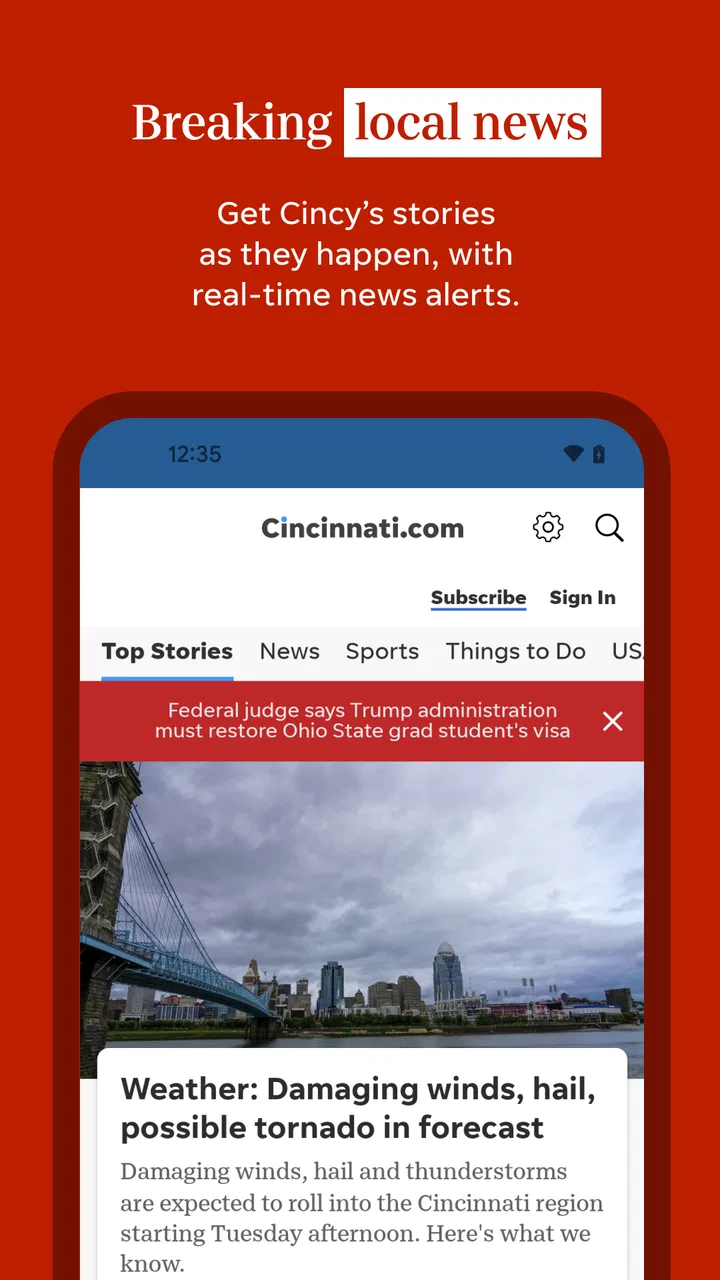
When I first opened Cincinnati.com: The Enquirer, I approached it as a local news reader rather than another broad national news app. That distinction matters. Its purpose is to keep Cincinnati-area stories, sports, weather, and entertainment close at hand, so the value comes from local relevance rather than from trying to cover every headline in the world. If you live in the region, work there, follow its teams, or have family nearby, that focus can make a daily news routine much easier.
This is a free News & Magazines app from USA TODAY Co., with an Everyone 10+ content rating. It has been available since early 2012 and is now at version 8.10.3, supporting devices running Android 8.0 or later. The app has passed 50 thousand installs, although its average rating sits at 2.6 from roughly 529 ratings and 258 written reviews. I would not treat that score as an automatic rejection, but I would take it as a reason to pay attention to the reading experience and subscription-related friction instead of assuming the app will suit everyone.
What to expect from the Cincinnati-focused news experience
The first thing to understand is that this is not simply a national news feed with a Cincinnati label attached. The app is designed around local awareness. I found the most useful mindset was to open it when I wanted to know what was happening in the area, not when I wanted a complete replacement for every other source of news on my phone.
You May Also Like

 Blood Strike: 2.5 Anniversary
Blood Strike’s Loadouts Turn Every Drop Into a Tactical Gamble
A close look at Blood Strike’s custom loadouts: how fast access to signature weapons reshapes its battle royale rhythm, rewards preparation, and narrows the gap between fights.

 Pandora - Music & Podcasts
Pandora’s Music Is Easy to Start, but Harder to Recover
Pandora’s strength is its low-effort path from a seed to a station. Its weak spot is how much confidence it asks you to place in connection, setup, and quiet recovery.

 8 Ball Pool
 Is Built on Rivalries, Rematches, and Routine
A close look at the rivalries, rematches, shared routines, and unanswered safety questions that turn a quick pool match into a persistent mobile community.

 Samsung Music
’s Quiet Strength Is Playing What You Already Own
Its reach comes less from spectacle than from dependable access to a personal library. That simplicity is both the app’s strongest retention engine and its ceiling.

 AccuWeather: Weather Radar
AccuWeather Review: A Quick, Clear Forecast for Everyday Decisions
For everyday plans, the best forecast is the one you can understand quickly. AccuWeather makes rain timing, radar, and local conditions easy to act on, with a few trade-offs.

 Hill Climb Racing
Why Hill Climb Racing Still Turns Crashes Into One More Run
A tiny car, a bumpy hill and one more upgrade: Hill Climb Racing keeps resurfacing because its simple chaos makes every near-miss feel personal.
More From Our News Desk
View All News


That makes it especially practical for a few everyday situations. I might check it before leaving for work to see whether a local story could affect my route, scan it during lunch for regional developments, or open it before a weekend outing to catch weather and entertainment coverage. A person who has moved away from Cincinnati but still wants a connection to home may also find the local emphasis more useful than a general national news application.
The app’s strongest promise is breadth within that local frame. News, sports, weather, and entertainment serve different reasons for opening the same app, and that combination can reduce the need to jump between several sources. I like that arrangement because it supports quick visits: I can look for one practical update without committing to a long reading session.
At the same time, a focused local app is not automatically the best tool for deep national coverage, international reporting, or a highly customizable news diet. If your main interest is financial news, world events, or a wide range of independent publications, a larger news aggregator will probably serve you better. Cincinnati.com: The Enquirer makes more sense as a local companion than as the only news service on a phone.
How I would use it during a normal day
For a first-time user, I recommend starting with a simple three-minute routine. Open the app in the morning, scan the main local headlines, then check the weather area before deciding whether to keep reading. Later, return only when you have a clear reason, such as following a developing local story or checking sports coverage. This prevents the app from becoming an endless scroll and helps you judge its usefulness based on information you genuinely need.
A realistic example would be a Saturday in Cincinnati. Before heading out, I would check the weather, glance at local news for disruptions or major developments, and then browse entertainment coverage for something to do. That is a more convincing use case than simply saying the app has several sections. The sections work together when a local decision depends on more than one kind of information.
One useful trade-off is speed versus context. A local app can help me identify what matters in the area faster than a general feed, but I may still need another source when I want a broader explanation or a second perspective. I see that as a sensible division of labor rather than a flaw, provided I remember what this app is built to do.
Installing the app and getting through the first setup
The installation path is straightforward for a compatible Android device. The minimum operating system is Android 8.0, so anyone using an older phone should check compatibility before planning around it. Once installed, I would begin by allowing the app to settle and then exploring the main screen instead of immediately trying to customize everything. The goal is to find the local news, sports, weather, and entertainment areas first.
Because the app is free to install, the initial decision is relatively low risk. However, the presence of in-app purchases ranging from $19.99 to $69.99 per item means I would read any subscription or purchase screen carefully before confirming anything. Free installation does not necessarily mean every part of the reading experience is free, and this is one of the most important points for a new user to understand.
I would also avoid judging the app after only one headline. Local news feeds can change throughout the day, and the first screen may not immediately show the topic that brought me there. A better first setup is to spend a few minutes opening each major area, noting which sections are relevant, and then closing anything that does not match my interests. That small exploration makes later visits feel more deliberate.
Another practical tip is to decide in advance whether I want the app mainly for breaking local awareness, regular reading, sports, weather, or entertainment planning. Those are different habits. Someone who wants only weather checks may find the broader app more than necessary, while someone following Cincinnati sports may return often enough to justify keeping it readily available.
What the developer and rating tell me
USA TODAY Co. gives the app a recognizable publishing background, but the developer name should not replace personal testing. A familiar publisher can still deliver an experience that feels awkward on a particular phone, and the modest 2.6 average rating suggests that some users have encountered problems or dissatisfaction. I would use the rating as a warning to evaluate navigation, reading comfort, and purchase prompts during the first session.
The Everyone 10+ label is also useful context for families. It indicates that the app is not positioned as a children’s reading product, so parents should still use their own judgment about whether its news coverage is appropriate for a particular child. For most adults and older readers, the label is unlikely to be a deciding factor, but it is worth noticing when setting up a shared device.
Finding a first meaningful result
The first successful action should be specific: use the app to answer one local question. For example, I might ask, “What is happening in Cincinnati today?” and scan the local news area, or “What should I know before going out this evening?” and combine weather with entertainment coverage. This gives the app a fair test and produces a useful result faster than wandering through every screen.
I would begin with the headline that most directly matches my situation, read enough to understand the context, and then return to the section view rather than opening unrelated stories one after another. That workflow helps me learn the app’s structure while keeping the session focused. It also makes it easier to decide whether the content is timely and relevant for my needs.
For sports followers, the first meaningful action could be checking the latest local team coverage and then returning later to see whether the story has developed. For someone commuting, it could be a quick local news and weather check before leaving home. For a newcomer to the city, the first success might be browsing entertainment coverage to discover what is happening nearby. The app becomes more valuable when I tie it to a real routine instead of treating it as a generic headline machine.
One non-obvious benefit of this approach is that it exposes the app’s limits early. If I repeatedly need to leave the app to verify a story, find wider context, or search for a subject outside Cincinnati, I learn that it should sit alongside another news source. That is better than expecting one local publication to cover every information need.
I also recommend reading with a purpose when the app presents a purchase prompt. If an article or section asks me to subscribe, I would pause and decide whether I am looking for occasional local updates or a regular publication habit. The available purchase range makes that decision important. A casual reader may prefer to use the free portions, while a committed local-news reader may consider whether the paid access fits their budget and reading frequency.
Common points of confusion and everyday friction
The biggest likely confusion is the difference between a free app and free access to everything inside it. The app costs nothing to install, but in-app purchases are listed between $19.99 and $69.99 per item. I would never tap through a payment screen quickly, especially if I downloaded the app only to read one story. Check the wording, understand what is being offered, and confirm that the purchase matches your intention.
A second source of confusion is expecting the home screen to behave like a personalized national aggregator. This is a Cincinnati-centered product, so its local orientation is the point. If I want a stream built around technology, world politics, science, or business from many publishers, I should use a broader alternative. The app is more successful when I judge it on local usefulness rather than on the number of unrelated topics it contains.
Navigation can also feel less obvious when several content areas compete for attention. My solution is to use a section-first habit: choose local news, sports, weather, or entertainment before deciding what to read. This is more efficient than opening every headline from the main screen. It also helps separate quick utility checks, such as weather, from longer reading sessions.
The rating adds another layer of caution. With an average of 2.6, I would not promise a perfectly smooth experience on every device. A low rating can reflect different complaints, so I would focus on my own practical tests: Can I find local coverage quickly? Is text comfortable to read? Do purchase prompts appear at a point that makes sense? Does the app fit my daily routine? Those answers matter more than the score alone.
Another trade-off concerns source variety. A dedicated local publisher can provide a more coherent regional focus than a mixed feed, but it may not offer the range of viewpoints or subject areas found in a multi-source reader. I would use this app for Cincinnati awareness, then compare important or complex stories with another trusted source when I need wider context. That is particularly sensible for decisions involving travel, public events, or rapidly changing situations.
Who should install it, and who should skip it
I would recommend trying it to Cincinnati residents who want local news, sports, weather, and entertainment in one place. It is also a reasonable choice for former residents, relatives of people in the area, and visitors who want a local perspective during a stay. The free installation makes it easy to test without committing immediately.
I would be more cautious if I wanted an entirely free reading experience, because the in-app purchase range can change the value calculation. I would also skip it as a primary news app if my interests are mostly national or international. A general news reader, a specialist publication, or a source-comparison routine would be better for those needs.
Families should remember the Everyone 10+ rating, and users with older Android phones should check the Android 8.0 requirement. These are simple details, but they prevent two common disappointments: installing on an unsupported device or assuming the content is designed specifically for young children.
Making the app useful beyond the first day
After the first successful session, I would build a repeatable routine instead of leaving the app unused on my phone. A short morning check can cover local headlines and weather, while an evening visit can focus on sports or entertainment. The important point is to give each visit a job. That makes the app feel like a local information tool rather than another notification source competing for attention.
If I follow one developing story, I would return to the same section rather than relying on memory of where I found it. Local stories can change quickly, and revisiting the relevant area is more reliable than assuming the first headline tells the whole story. When the subject becomes important, I would also compare it with another established source to add context.
For entertainment planning, I would use the app earlier in the day rather than waiting until I am already on the way out. That gives me time to combine local coverage with weather and decide whether the information actually fits my plans. This is a small workflow, but it is one of the clearest ways the app’s different content areas can work together.
Sports readers may get the most repeat value because they have a natural reason to return. Even then, I would keep expectations realistic: this app is best for following Cincinnati-oriented coverage, not for replacing every specialist sports service, score tool, or national analysis source. The right choice depends on whether I want local reporting or detailed live-game functionality.
Version 8.10.3 is the current version, so I would keep the app updated through the normal app-store process when updates are available. Staying current is especially sensible for a news application, where compatibility and presentation can affect daily reading. I would still judge each update by how the app behaves on my device rather than assuming a newer version automatically fixes every annoyance.
The app’s age also gives it a long history as a local news product, but longevity alone does not guarantee that its current design will match modern expectations. That is why I would spend the first week testing it during real situations: a morning commute, a weather-sensitive plan, a sports check, and a search for local entertainment. Those tests reveal more than a single casual opening.
My recommendation after using it as a local companion
I see Cincinnati.com: The Enquirer as a focused tool with a clear audience. Its best quality is concentration: it brings Cincinnati news, sports, weather, and entertainment into one local destination instead of making me assemble that awareness from unrelated sources. For a resident who wants a convenient daily check, that focus can be genuinely useful.
My reservations are equally clear. The 2.6 average rating tells me to expect possible friction, and the in-app purchase range means I would examine subscription prompts rather than assuming the entire experience is free. The app also cannot replace a broad national or international news service, and readers who demand many viewpoints may prefer a multi-source alternative.
Still, I would recommend giving it a careful trial if Cincinnati coverage is personally relevant. Install it, check the local news and weather areas, use sports or entertainment for a real decision, and pay attention to where paid access enters the experience. The best reason to keep it is not the number of sections, but whether it helps you make faster, better-informed local choices.
For me, that is the final test. If I can open it and quickly understand what matters around Cincinnati, it earns a place alongside my other news sources. If I need broader reporting, more customization, or a strictly free reading habit, I would choose something else. Used for its actual purpose and approached with sensible expectations, it can be a useful local companion rather than an all-purpose news replacement.
FAQs for Cincinnati.com: The Enquirer
01What is Cincinnati.com: The Enquirer?
Cincinnati.com: The Enquirer is the mobile news app for The Cincinnati Enquirer, providing local coverage for Cincinnati, Northern Kentucky, and surrounding communities. After installing it, users can browse breaking news, politics, crime, sports, entertainment, business, lifestyle stories, and opinion content in one place. It is designed for readers who want regional reporting and updates while traveling or away from a desktop browser.
02Is Cincinnati.com: The Enquirer free to download and use?
The app is generally free to download, and some articles or features may be available without payment. However, access to the complete catalog can depend on the publication’s subscription policy, which may include a digital subscription or a limited number of free articles. Before downloading, users should review the current pricing, trial terms, renewal conditions, and account requirements shown in the app or official store listing.
03What types of news and features are available in the app?
The app focuses on local and regional journalism, including breaking news, investigative reports, community updates, Cincinnati Bengals and other sports coverage, weather, entertainment, food, business, and lifestyle articles. Depending on the current version, it may also offer personalized sections, alerts for important developments, photo galleries, videos, newsletters, and saved or bookmarked stories for later reading.
04Does the app send notifications and can they be customized?
Cincinnati.com: The Enquirer may request permission to send push notifications for breaking news, major local events, sports results, weather developments, and other editorial updates. Notifications can be helpful if you want immediate information, but frequent alerts may become distracting. On both Android and iOS, you can usually manage notification access through the device settings, while the app may provide additional controls for selecting topics or alert categories.
05What should I know about privacy, accounts, and subscriptions before installing?
Using the app may involve creating or signing into a publisher account, particularly when accessing subscriber-only articles, managing a subscription, or synchronizing preferences across devices. The app may collect information such as device details, usage activity, identifiers, and location-related data, depending on your settings and the platform. Review the current privacy policy and subscription terms, and check whether auto-renewal is enabled before starting a paid plan.
Pros
- Fast access to breaking news across Cincinnati and Northern Kentucky
- Strong local coverage of neighborhoods
- schools
- sports
- and community events
- Clean article layout that is easy to read on a phone
- Personalized alerts help you follow important local stories
- Useful mix of news
- opinion
- photos
- and multimedia content
Cons
- Many full articles may require a paid subscription
- Frequent notifications can feel excessive unless carefully customized
- Some content and features depend on a reliable internet connection
- Advertising can interrupt the reading experience
- Coverage is highly regional and less useful outside the Cincinnati area

Cincinnati.com: The Enquirer
Gallery